
From Cities to Attendee Emails: Instant Time Zone Detection with Zero Email Storage
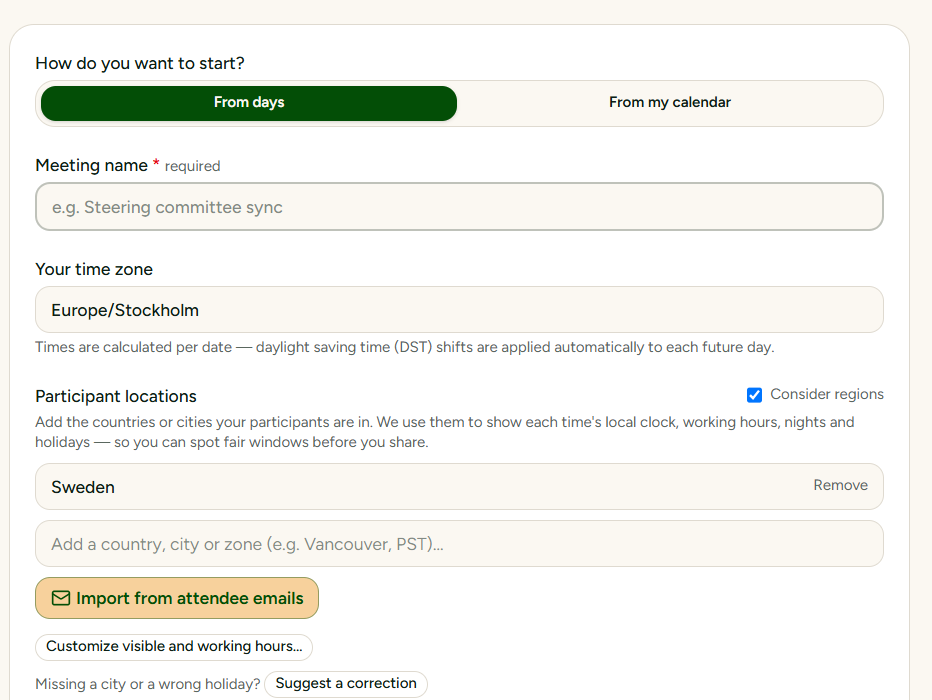
When we launched SyncWithTeam, our first major milestone was eliminating time zone math entirely. Instead of forcing you to figure out if Munich is on CET or CEST, or which Australian state observes daylight saving time, we indexed over 2,200 global cities with local spellings. You type the city, and the app takes care of the offsets.
Today, we are taking that logic one step further: you shouldn't even have to look up which cities your attendees are in.
When you organize a meeting, you usually already have a list of attendee email addresses—sitting in an Outlook invite, a Gmail thread, a spreadsheet, or your clipboard.
With our new Import from attendee emails feature, you can simply paste that list, and SyncWithTeam will automatically detect the locations and map them directly into your meeting grid.
Paste Anything: Outlook Semicolons, Full Names, or Raw Text
You don't need to clean up your text or format commas. Whether your mail client uses semicolons (person1@company.com; person2@uni.edu), angle brackets with display names ("Jane Doe" <jane@ox.ac.uk>; Smith, John <john@mit.edu>), or simple line breaks copied from a spreadsheet, our parser extracts the valid addresses automatically and ignores the rest.
750,000+ Domains Indexed Globally
To make this work seamlessly across academia, enterprise, public administration, and research institutions, we pre-indexed over 750,000 domains worldwide using open data from the Research Organization Registry (ROR), Wikidata, and global municipal registries.
- Universities & Research Institutes: Domain suffixes like
ox.ac.uk,harvard.edu,ethz.ch, ortum.deimmediately resolve to their campus cities and time zones. - Global Enterprises & Municipalities: Corporate and regional domains map to their primary locations, with clear indicators if a corporate headquarters is being suggested.
- Smart Parent-Domain Matching: Departmental subdomains automatically resolve up to their parent institution.
Absolute Privacy: Zero Email Storage
Most scheduling platforms ask you to connect your contact book or upload attendee emails to their servers, where they get logged, tracked, and marketed to.
SyncWithTeam takes the exact opposite approach:
- 100% Client-Side Parsing: Your clipboard text is parsed strictly inside your own browser.
- Nothing Before the
@Ever Leaves Your Machine: Names, usernames, and full email addresses are stripped locally before any network request is made. - Only Anonymous Domains are Queried: Our servers only receive a deduplicated list of domain names (like
ki.seorspotify.com) to return city coordinates. We never know who the individuals are, and we store zero personal identifiers. - No Accounts & No Tracking The feature is completely free, does not require an account.
Full Control and Instant Invitation Drafts
Automation is only useful if it doesn't get in your way. When you import emails:
- You see the proposed cities alongside an honest note whenever an estimate is used (e.g.,
— based in Armonk, please check). - You can change, reassign, or discard any location with a single click.
- Optionally, SyncWithTeam can automatically adjust your expected response counter to match the number of invited participants.
- Once your poll is created, a ready-made invitation draft is generated for you. With one click, you can open it directly in your local email app (
mailto:) with all attendees pre-filled—saving you the hassle of composing invitations from scratch.
The feature is live right now on the homepage under Participant locations.