
Find the right help
A first meeting, a tricky time zone, or the next round with your team.
Plan & create
Places, dates and your first invitation.
Guest replies
Names, PINs and marking availability.
Booking & series
Find a time, book a series or keep collecting.
Deadlines & calendars
Reminders, calendar connections and privacy.
All how-to guides
Looking for a quick answer? →11 results
Guide · 5 min read
Importing Locations from Attendee Emails: How it Works and Honor Privacy
Setting up a cross-timezone meeting often starts with a familiar chore: asking everyone where they currently work or manually looking up which office each participant belongs to. SyncWithTeam includes an automated attendee email parser that turns raw email lists into exact geographic locations and time zones in seconds—without ever storing or sending personal email addresses. Here is how the feature works, how to use it, and what happens behind the scenes.
Guide · 7 min read
How SyncWithTeam works
Plan, share and book in three steps — then see how local dates, daylight saving, holidays and calendar privacy work behind the scenes.
Guide · 5 min read
Managing Reusable Groups, Meeting Defaults, and Your Account Hub
Guide · 4 min read
Protect Your Meeting: Links, Passwords and Guest PINs
Keep your organiser link private and learn how to add, change or remove a meeting password.
Guide · 5 min read
Booking Multiple Meetings from One Poll: Series, Recurring Syncs, and Partial Bookings
How to schedule multiple sessions, multi-day workshops, or sprint syncs from a single invite without asking participants to vote multiple times.
Guide · 5 min read
Creating Your First Global Meeting: From Days or From Calendar
Step by step: add locations, choose dates, offer office hours and share the invitation — with holidays handled automatically.
Guide · 6 min read
Finding the Best Time and Booking the Meeting: A Step-by-Step Organiser Guide
How to read participant heatmaps, filter by essential attendees, pick the best time window, and book single meetings or series with partial booking
Guide · 4 min read
How Guests Respond in Under 20 Seconds (No Account Needed)
What participants see when they open an invitation, how they mark availability and how they can change or withdraw their answer.
Guide · 5 min read
How to Connect Your Work Calendar Privately: Zero Title Exposure
Connect Google, Outlook, or Apple calendars securely. SyncWithTeam reads only free/busy timestamps—never event titles, notes, or attendee details.
Guide · 5 min read
Partial Booking: How to Book Some Times and Keep the Poll Open
Need to confirm the first upcoming meeting while keeping the poll open for future weeks? Learn how partial booking and period locking work in SyncWithTeam.
Guide · 5 min read
Setting Deadlines and Automated Reminders: Soft vs Hard Deadlines
Learn how to use soft and hard deadlines, expected response targets, and automated stagnation reminders to finalize meetings without chasing people.
Latest guides & news
Guide · 5 min read
Importing Locations from Attendee Emails: How it Works and Honor Privacy
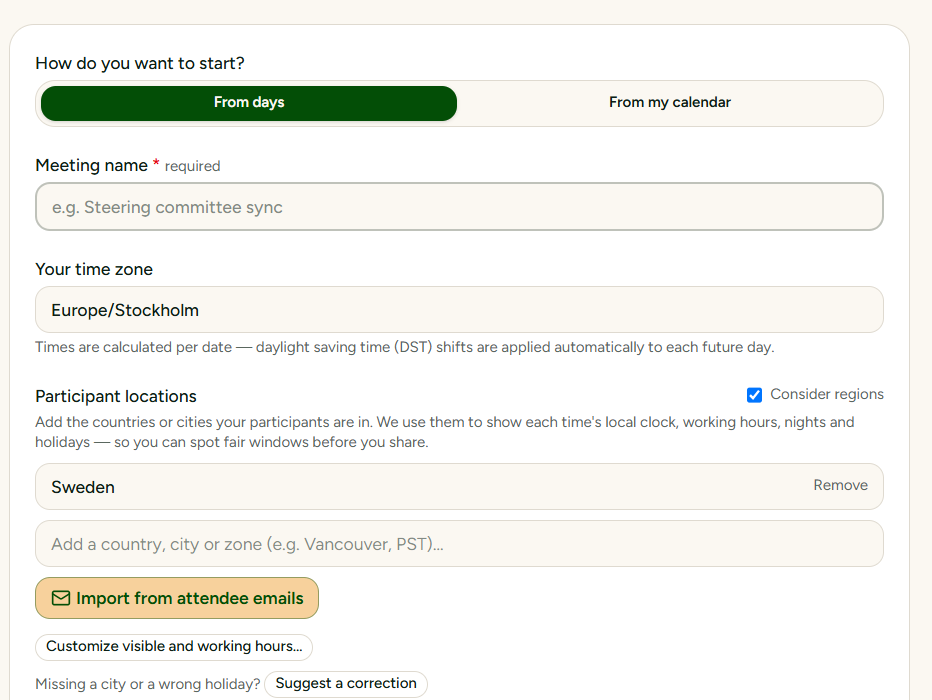
Setting up a cross-timezone meeting often starts with a familiar chore: asking everyone where they currently work or manually looking up which office each participant belongs to. SyncWithTeam includes an automated attendee email parser that turns raw email lists into exact geographic locations and time zones in seconds—without ever storing or sending personal email addresses. Here is how the feature works, how to use it, and what happens behind the scenes.
News
From Cities to Attendee Emails: Instant Time Zone Detection with Zero Email Storage
We want to make it even easier for you and now release find location from email function.
News · 4 min
From Cities to Attendee Emails: Instant Time Zone Detection with Zero Email Storage
Paste your attendee emails and SyncWithTeam suggests everyone's city from 750,000+ indexed domains — nothing before the @ ever leaves your browser.