
6 min read · Updated 2026-11-09
Daylight Saving Time: Why International Meetings Break Twice a Year
You found a meeting time that works for everyone. It is considerate of working hours, avoids the middle of the night, and fits neatly into everyone’s week.
Then, without anyone changing the invitation, one participant joins an hour early. Or an hour late.
This is one of the most common problems in international scheduling: daylight saving time does not begin and end on the same date everywhere.
The good news is that you do not need to memorise every country’s clock-change rules. You only need to understand what can change, choose cities rather than fixed offsets, and review the actual dates you are offering.
Why international meetings shift by one hour
A time zone is not always a fixed number of hours from another time zone.
For example, Stockholm and New York are usually six hours apart. But in spring, the United States changes to daylight saving time before most of Europe does. For a short period, the difference is only five hours.
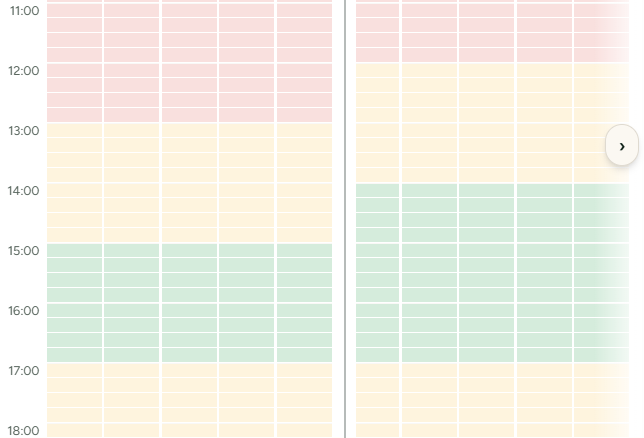
The opposite happens in autumn: Europe returns to standard time before the United States does.
That means a recurring meeting can appear to move by one hour for someone, even when the organiser has not edited a single date.
This is not a calendar bug. It is the result of two locations following different daylight saving schedules.
The risk is highest during the changeover weeks
The confusing period is not all year. It is usually limited to a few weeks in spring and autumn.
A meeting between Stockholm and New York is a useful example:
- Before the US clock change, Stockholm is normally six hours ahead of New York.
- After the US changes in March, but before Sweden changes, Stockholm is only five hours ahead.
- Once Sweden also changes, the usual six-hour gap returns.
The meeting may still be shown correctly in each person’s calendar. But if someone expects the normal time difference, they may believe the meeting has moved or accidentally plan something else at the same local time.
This is why it is worth checking the specific meeting dates rather than relying on “New York is six hours behind Stockholm.”
💡 Go deeper: Why time zone abbreviations cause costly mistakes.
Use cities, not UTC offsets
A fixed UTC offset is useful for a quick calculation, but it is not a reliable way to plan a meeting weeks or months ahead.
“UTC+1” does not tell you whether the location will still be UTC+1 on the date of the meeting. Stockholm, London, New York, Sydney and many other places change their clocks during the year. Other places do not change at all.
Choose a city or recognised time zone whenever possible:
- Stockholm rather than “UTC+1”
- New York rather than “UTC−5”
- London rather than “UTC+0”
- Sydney rather than “UTC+10”
A date-aware scheduling tool can then apply the right local time zone rule for each selected date.
This matters especially when you are planning a meeting series, booking something months in advance, or comparing working hours across several regions.
Check every proposed date, not just the first one
A single meeting is usually easy to verify. The bigger risk comes when you offer several possible dates or run a recurring meeting.
Imagine that you offer three Wednesdays around the March daylight saving period. The first and third dates may have the usual time difference between Stockholm and New York, while the middle date has a different one.
If you only check the first date, you can miss the change in the middle.
A safer routine is:
- Add every participant location.
- Choose the actual dates you are considering.
- Mark the times that work on each date.
- Look for dates where the overlap changes unexpectedly.
- Let participants see the options in their own local time.
This takes very little extra effort and prevents the “I thought it was at the usual time” message later.
Be especially careful with recurring meetings
Recurring meetings are convenient, but they can hide daylight saving changes.
A weekly meeting at 15:00 in Stockholm may be:
- 09:00 in New York for most of the year,
- 10:00 in New York during the short spring transition period,
- and then 09:00 again once Europe changes its clocks.
Neither person is wrong. The meeting is simply tied to one location’s local time while the relationship between the two locations changes.
Before setting up a recurring international meeting, decide which local time should remain stable.
For example:
- If the organiser’s working day should stay stable, set the meeting in the organiser’s local time and make the temporary shift clear to everyone else.
- If the meeting needs to remain at the same local time for a participant in another country, review whether a different approach is needed around the clock changes.
- If the team spans several regions, offer a few options and let people show which dates and times are practical.
For an important meeting, it is often better to schedule the individual dates deliberately rather than assume every week will feel identical worldwide.
Some countries do not use daylight saving time
Not every country moves its clocks.
Many countries near the equator do not observe daylight saving time. Large parts of Asia and Africa do not either. That does not remove the issue: it means the time difference can still change when the other participant’s country moves its clocks.
For example, a colleague in a location without daylight saving time may see their meeting time change twice a year because the organiser’s location does observe it.
The practical lesson is the same: avoid planning from a remembered offset. Plan from cities and real dates.
Let every guest answer in their own local time
A good invitation should not require guests to calculate time differences.
When a guest opens a SyncWithTeam invitation, the proposed times are shown in their own local time zone. They can mark the options that work for them without converting from the organiser’s clock.
That is particularly useful during daylight saving transitions, when a familiar time difference may only be temporarily true.
The organiser can compare availability across locations, while each guest answers the simpler question: “Can I attend at this local time?”
💡 Try it yourself: Create your first global meeting step by step, or take the interactive tour — every time is calculated for its own date.
A quick checklist before sending an international invite
Before sharing the invite, check that you have:
- chosen participant cities rather than manually typed UTC offsets;
- selected the real meeting dates, including every date in a series;
- looked for clock changes between the first and last proposed date;
- considered whether one participant is repeatedly carrying an inconvenient time;
- made sure guests will see the options in their own local time.
Daylight saving time does not need to make international planning difficult. It only becomes confusing when it is invisible.
Choose locations, use date-aware times, and let the actual dates guide the plan. Then the one-hour change is something your meeting handles automatically, rather than something your team has to discover the hard way.