
6 min read · Updated 2026-11-09
How to Avoid Public Holidays When Scheduling Globally
You can do everything “right” and still accidentally suggest a terrible meeting day.
You check your own calendar. You avoid weekends. You offer a few sensible-looking dates. People start answering. One date looks like the clear winner.
Then someone writes:
I’m sorry, that’s a public holiday here.
Now the problem is bigger than one unavailable person. People have already spent time answering. The organiser has started planning around the winning date. Some participants may have assumed the meeting was almost settled. And if the holiday affects someone important, you may have to reopen the whole poll.
Public holidays are easy to miss because they are not shared equally. Your calendar usually knows your country. It may not know everyone else’s.
The organiser’s problem: you do not know what you do not know
For the organiser, the hard part is not always time zones. It is knowing which dates should not have been offered in the first place.
If you are in Sweden, your calendar will help you avoid Swedish holidays. It may remind you about Christmas, Easter, Midsummer or a local day off. But if you invite people in Germany, India, Canada, Singapore or the United States, your calendar may not warn you about their holidays.
And even if you remember to check the country, that may not be enough.
Some holidays are regional. A colleague in Munich may be off while a colleague in Berlin is working. Someone in Quebec may have a different holiday calendar from someone in Ontario. In India, holidays can vary a lot between states.
So the organiser ends up in an awkward position: you are expected to offer good dates, but you may not have enough local knowledge to know what “good” means.
The participant’s problem: “our holidays are always the ones people forget”
There is also another side to this.
If a team mostly talks about European or Christian holidays, but repeatedly forgets other religious, national or regional holidays, people notice.
Maybe nobody says anything the first time. Maybe they politely decline. Maybe they answer “not available” without explaining why. But over time it can feel like their calendar is treated as an exception, while the majority calendar is treated as normal.
That is not usually intentional. Most organisers are not trying to exclude anyone. But the effect can still be frustrating.
It can sound like:
We remembered Easter and Christmas, but forgot Eid again.
Or:
We avoided the European summer break, but scheduled straight into Diwali.
Or:
Everyone knows not to book around US Thanksgiving, but nobody checked our national holiday.
The point is not that every organiser should personally know every holiday in the world. That is unrealistic. The point is that the scheduling process should not depend on one person remembering everything.
The poll problem: bad dates create bad results
A missed holiday does not only inconvenience one person. It can damage the whole scheduling process.
If you include a holiday in the poll, a few things can happen:
People spend time answering options that should never have been offered.
A date may look popular because the people affected by the holiday have not replied yet.
The organiser may start planning around a false winner.
Participants may get the impression that the meeting is nearly booked.
The team may have to cancel, reopen the poll and ask everyone to answer again.
That last part matters. Asking people to fill in availability once is fine. Asking them to do it again because the first poll contained bad dates is where scheduling starts to feel messy.
It also creates false hope. A date can look perfect in the results, but only because an important holiday was invisible.
A more careful way to choose dates
You do not need to become an expert in every country’s calendar. But it helps to slow down before sending the poll.
Before you offer dates, ask:
Where are people located?
Are any holidays or local days off inside this date range?
Are any of the dates weekends for some participants?
Are there regional holidays we might miss if we only check the country?
Are any dates right next to a major holiday, where many people may take bridge days?
This is especially important for:
- international workshops
- project kick-offs
- board or steering group meetings
- customer meetings
- recurring meetings with global teams
- meetings where one or two people are essential
For a casual internal check-in, one missed date may not be a disaster. For a workshop where flights, preparation or customer expectations are involved, it is worth checking more carefully.
Watch out for regional holidays
National calendars are only the first layer.
Regional holidays can matter in countries such as:
- Germany
- Switzerland
- Spain
- India
- Canada
- United States
If you know the participant’s city or region, use it. “Germany” is helpful. “Munich” is better. “Canada” is helpful. “Quebec” or “Ontario” may be better.
You do not need perfect information for every casual meeting, but for important meetings the extra detail can save you from restarting later.
Moving holidays make last year’s memory unreliable
Some holidays happen on the same date every year. Others move.
Examples include:
- Easter
- Eid al-Fitr
- Eid al-Adha
- Lunar New Year
- Diwali
- Passover
- Pentecost
- Ascension
This is why “we avoided it last year” does not always help. The holiday may have moved. The team may have changed. The countries involved may be different.
A date that was harmless last year may be a bad choice this year.
Weekends are not the same everywhere
Another quiet mistake is assuming that every country treats Saturday and Sunday the same way.
Many do, but not all. In some places, Friday is part of the weekend. In others, Friday may be a shorter or different kind of workday. Local work patterns matter.
This does not mean you can never offer a weekend day. Clubs, volunteer groups and community meetings may prefer weekends. The problem is offering a day off by accident.
If you choose a weekend or holiday deliberately, that is different from discovering it after people have answered.
A practical routine
Here is a simple routine that catches most problems:
List each participant’s country and city if you know it.
Check the date range before creating the poll.
Remove obvious national holidays.
Check regional holidays for important participants.
Mark or avoid bridge days around major holidays.
Only send dates you would actually be willing to book.
If you are unsure, say so in the invitation.
For example:
I’ve tried to avoid public holidays for the locations I know about, but please mark anything I missed as unavailable.
That small sentence makes the process feel more respectful. It tells people you tried, without pretending you know every local calendar perfectly.
How SyncWithTeam helps
SyncWithTeam tries to make this visible before the poll goes out.
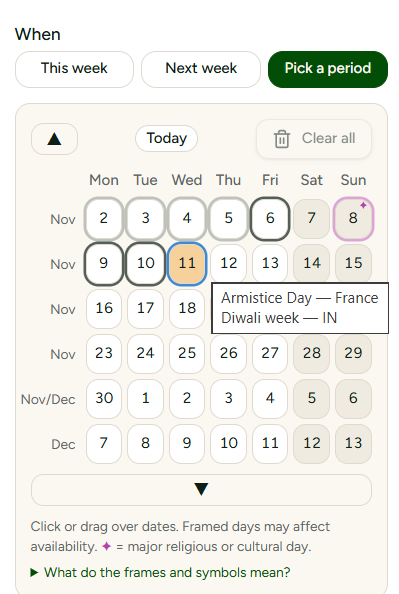
When you add participant locations, weekends and public holidays are shown directly in the date picker and the scheduling grid. Days off are locked by default, so you do not accidentally offer them as if they were normal working days.
You can still unlock them if you want to. That matters because not every meeting is a work meeting. A club, family group or volunteer team may deliberately want weekends.
The important thing is that the organiser sees the warning before people spend time answering.
Try SyncWithTeam for free
Ready to schedule without holiday surprises? Create your first meeting invitation in seconds — no account required.
💡 How-to guide: Creating your first global meeting shows where holidays appear while you pick dates.