
6 min read · Updated 2026-11-09
How to Schedule Meetings Across Multiple Time Zones
Scheduling across time zones is not hard because people are careless. It is hard because nobody can keep everyone’s local day in their head.
A time that looks perfectly normal in Stockholm might be early in New York, late in Singapore and already tomorrow in Sydney. The organiser may think they have found a reasonable slot. One participant may quietly accept an evening call. Another may misread the date completely.
Nobody did anything wrong. The problem was just hidden until too late.
The short version
When you schedule across time zones, do not start from your own clock.
Start with the people:
- where they are
- what their local working day looks like
- which date it is for them
- whether the time is normal, inconvenient or genuinely bad
Then offer a small set of realistic options and let people answer in their own local time.
The organiser’s problem: your own time looks normal
Most scheduling mistakes start innocently.
You look at your calendar, find a few open times and think:
Tuesday at 15:00 should be fine.
And maybe it is fine for you. It may even be fine for two or three other people.
But if the team includes several locations, that one time can mean very different things.
Example:
| City | Local time |
|---|---|
| Stockholm | 15:00 |
| New York | 09:00 |
| Singapore | 22:00 |
| Sydney | 01:00 next day |
From Stockholm, 15:00 looks like a safe afternoon meeting. From Singapore, it is late evening. From Sydney, it is the middle of the night and already the next day.
That does not mean 15:00 is always wrong. It means the organiser should be able to see the cost before sending it.
The participant’s problem: “technically possible” is not the same as good
People often accept times that are not really good for them.
They may not want to be difficult. They may think it is only a one-off. They may not realise the same time will become a recurring meeting.
One late meeting is usually fine. Four late meetings in a row starts to feel different.
This is why it helps to separate different kinds of availability:
- normal working hours
- lunch or near-lunch
- early morning
- evening
- weekend or local day off
A time can be possible and still be unfair if the same person always pays the price.
The poll problem: unclear times create bad answers
A meeting poll only works if people understand what they are answering.
If someone sees a time in the organiser’s time zone and mentally converts it wrong, their answer is not reliable. If someone forgets that the meeting is on their tomorrow, not their today, the poll result may look better than it really is.
That is how you get false confidence:
Great, everyone can attend.
But later:
Sorry, I thought that was 15:00 my time.
or:
I didn’t realise that was Sunday for me.
At that point, the organiser may need to reopen the poll and ask everyone again.
Use cities, not abbreviations
Time zone abbreviations look short, but they are not always clear.
“IST” can mean India, Ireland or Israel. “CST” can mean North American Central Time, China Standard Time or Cuba Standard Time.
Cities are easier:
- Stockholm
- New York
- Singapore
- Sydney
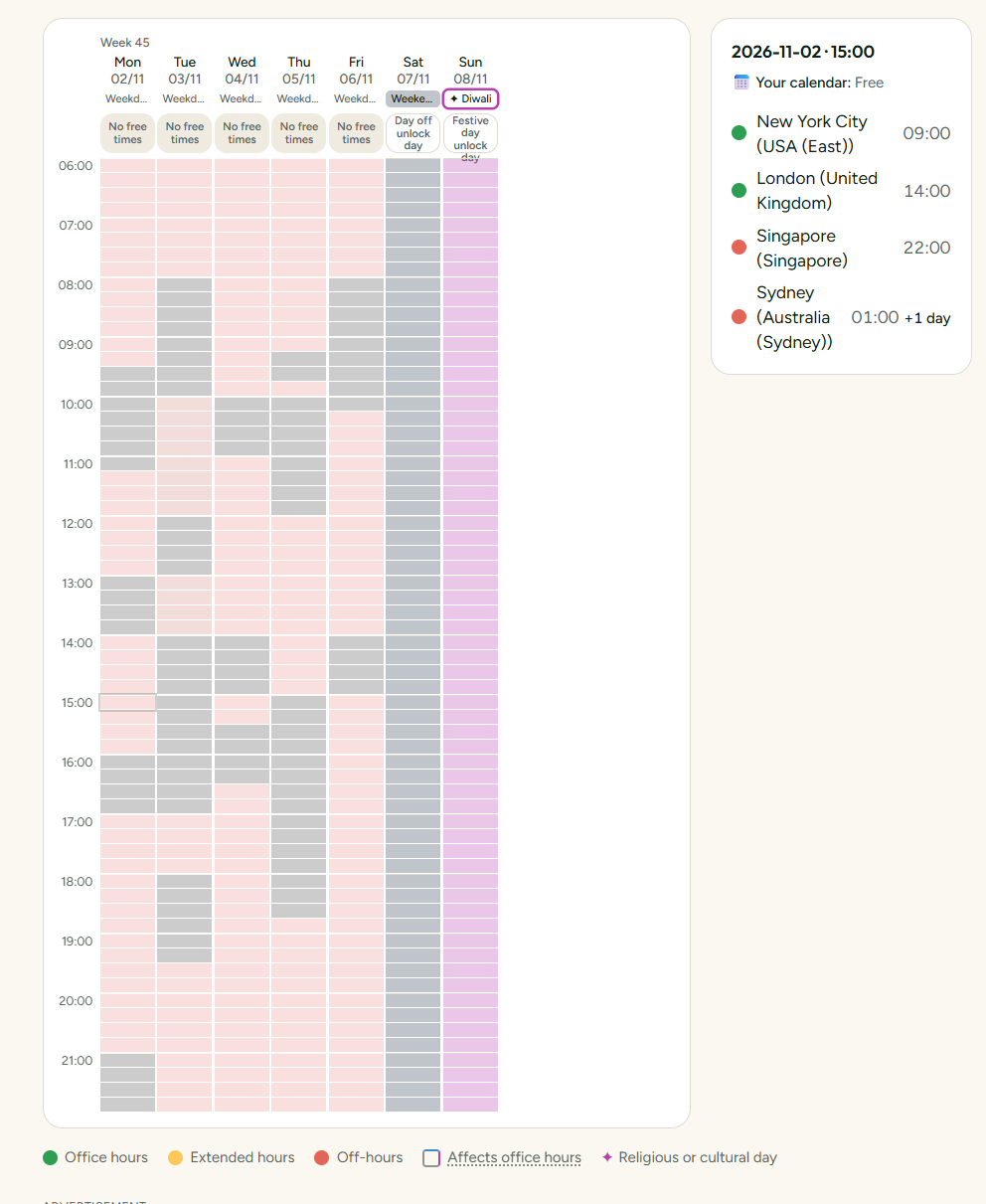
A city plus a date gives the scheduling tool enough information to calculate the correct local time, including daylight saving time.
Bad:
Can everyone do 15:00 CET?
Better:
Please choose from these options. They are shown in your own local time.
Start with local working days
A practical way to begin is to list each participant’s location and normal working window.
Example:
| Location | Normal working hours |
|---|---|
| London | 09:00-17:00 |
| New York | 09:00-17:00 |
| Dubai | 09:00-18:00 |
| Mumbai | 09:30-18:30 |
| Singapore | 09:00-18:00 |
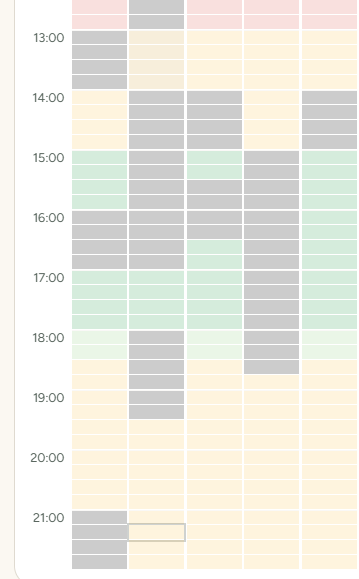
Then compare those windows on one timeline.
The real overlap is often smaller than people expect. Sometimes there is no perfect overlap at all.
If there is no perfect time, make the trade-off visible
Some teams simply do not have a meeting time that is good for everyone.
That is common when you combine:
- North America and Asia
- Europe and Australia
- US West Coast and Asia-Pacific
In those cases, the goal is not to pretend the perfect time exists. The goal is to choose knowingly.
For recurring meetings, rotate the inconvenience.
Example:
| Week | Better for | Harder for |
|---|---|---|
| Week 1 | Europe and Americas | Asia-Pacific |
| Week 2 | Europe and Asia | Americas |
| Week 3 | Americas and Asia-Pacific | Europe |
That may still be imperfect, but it is more honest than making the same region take the bad time every week.
Offer options, not one “does this work?”
A single proposed time puts pressure on people to agree or object.
A small set of options gives better information.
Usually, 4-8 options is enough for an international group. Fewer can be too narrow. Too many can make people postpone answering.
Ask people to mark:
- available
- maybe
- not available
A “maybe” is useful. It often means:
I can do it, but it costs me something.
That is different from a clear yes.
A simple routine
Before sending a global meeting poll:
Add every participant’s city or country.
Check the local date for each location.
Look for overlapping office hours.
Notice who would be early, late or outside work.
Avoid public holidays and weekends unless intentional.
Offer 4-8 realistic options.
Let people answer in their own local time.
Choose the best option for essential participants first.
How SyncWithTeam helps
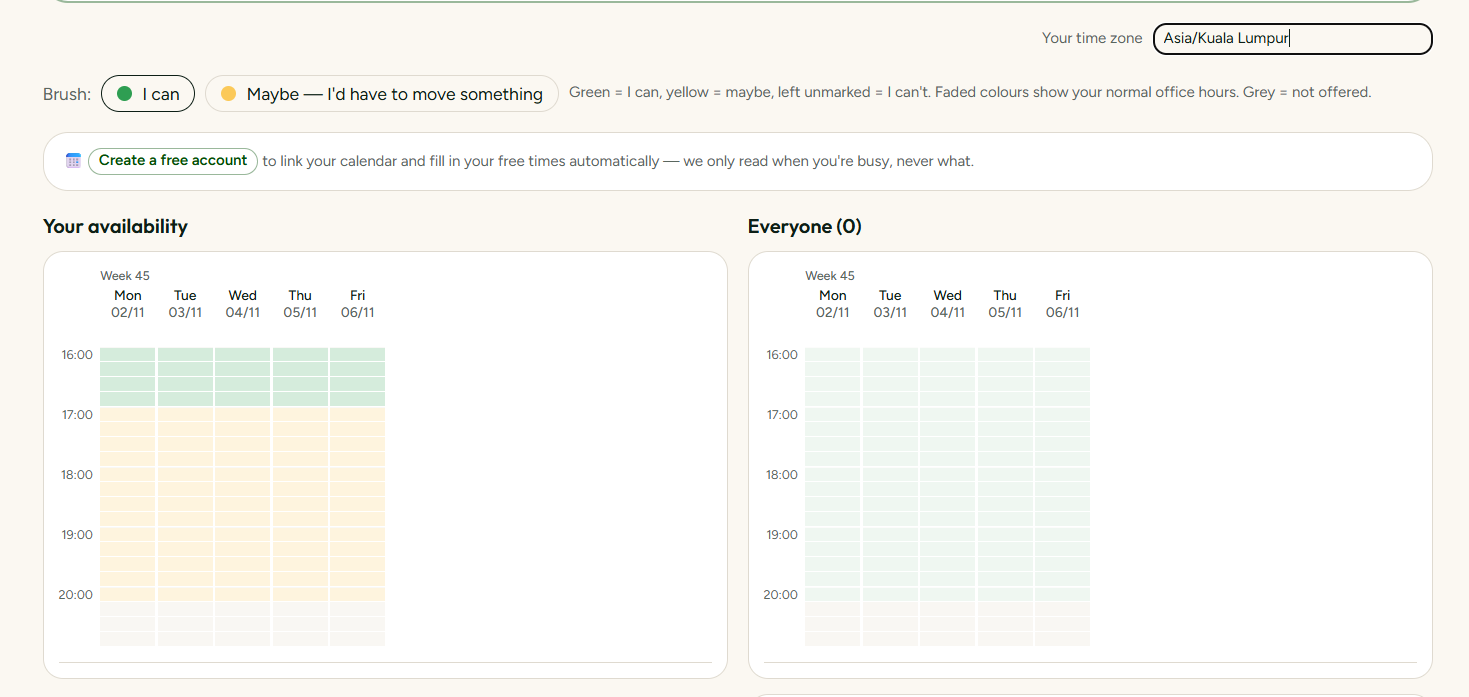
SyncWithTeam shows participant locations side by side, so you can see office hours, lunch, evenings, weekends and public holidays before sending the poll.
Guests answer in their own local time and do not need an account.
Plan a meeting — free
💡 Keep reading: When one team always gets the bad meeting time and the step-by-step first meeting guide.